
[gallery_bank source_type=”gallery” id=”35″ layout_type=”slideshow_layout” alignment=”left” slideshow_width=”800″ auto_play=”yes” time_interval=”3″ order_images_by=”sort_asc” sort_images_by=”sort_order” slideshow_filmstrips=”hide” control_buttons=”hide” gallery_title=”hide” gallery_description=”hide” thumbnail_title=”hide” thumbnail_description=”hide” filters=”disable” lazy_load=”disable” search_box=”disable” order_by=”disable” animation_effects=”fadeIn” special_effects=”none”][/gallery_bank]
LinkedIn for Small Businesses: Top Tips 2019
 Another week, another meeting write-up!
This time the wonderful Cécile Jemmett of LinkedIn with Cécile came to talk to our Tunbridge Wells Mums in Business Network about how to use LinkedIn for your small business.
Interestingly Cécile was first inspired to use LinkedIn at one of our meet-ups about 5 years ago and has never looked back. Since then, helping others use it has turned into her entire business.
Why use LinkedIn?
For Cécile, LinkedIn has been A Game Changer (with capitals!) and has transformed her business, and in turn her life. She’s found it more successful than any of the other social media channels because:
- LinkedIn has such a high Google authority that it’s really helped her SEO
- It has a much more powerful and accurate search function than other platforms to help you find and reach the right people
- The trust factor – it’s a platform full of professional people with a business mindset
- These type of users typically have money so make good customers
- And, whilst it looks a little dry, it’s far simpler to use than you might think (always good to hear!).
So, here are Cécile’s tips and tricks for making the most of LinkedIn for your small business.
The “Customer Life Cycle” and how it works on LinkedIn
Similar to other social media platforms, from a business perspective LinkedIn is all about connecting with your potential customers and hopefully converting them into paying clients by taking them through a “customer life cycle” process:
- Know – they get to know of you
- Like – they get to like you and what you’re doing
- Trust – they see you demonstrate that you’re an expert in your field and can solve their problem or fulfill their need
- Buy – when they’re ready to buy, they know exactly where to find you
Traditionally (and theoretically) it takes 7 touches to move through this cycle, but all forms of social media complicate and extend this process because of the sheer noise, volume and distractions happening there. So the key is consistency of posting to help move people through this process and make sure you’re still there despite the noise.
Sell to everyone: you sell to no-one
As with any business idea and marketing strategy, you need to narrow your audience so that you can communicate with them in a way that is meaningful and relevant. If you try and appeal to everyone you end up being too generalist and don’t really hit the mark with anyone. And this applies just as much on the way you use LinkedIn. In short, you need to know exactly:
- who you want to help (your ideal client avatar)
- with what problem (if you’re not sure, ask your clients what you solved for them)
- how you can help them.
Once you’ve defined that, the search tool on LinkedIn allows you to find those exact people and connect with them.
Get your profile headline right
The headline is the short text that comes right after your name and sums you up in a few words and what people see at a glance by your name every time you post on LinkedIn.
Cécile recommended being ultra clear here and being very specific about the who/what/how, and also taking into account keywords and key phrases that people might type in to search. For example:
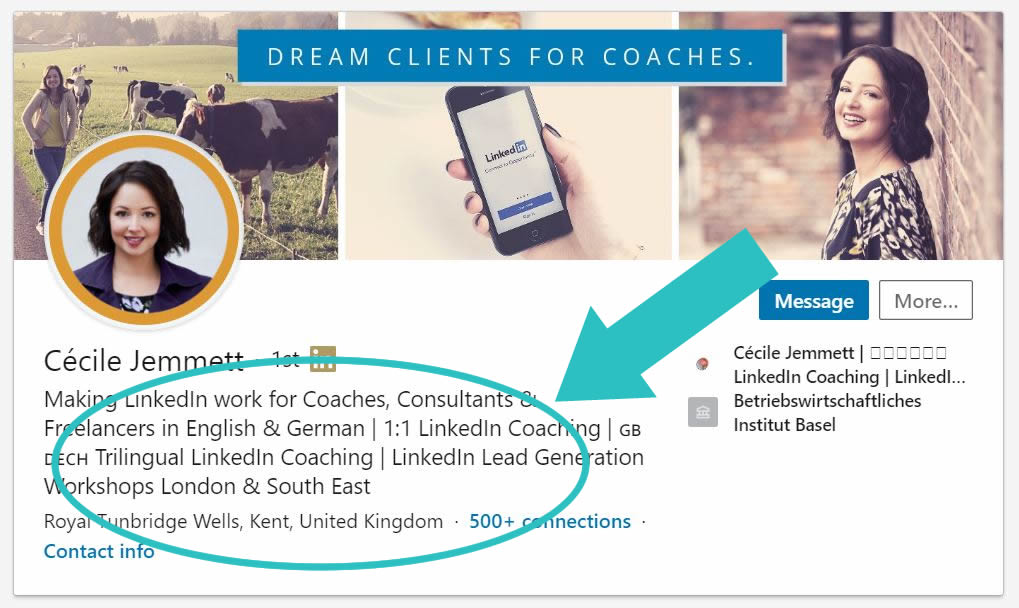
If you do more than one thing it can be tempting to try and cover it all off in the headline but Cecile recommended focusing on one aspect and testing it out for a minimum of 4 months before changing it and trying out something else.
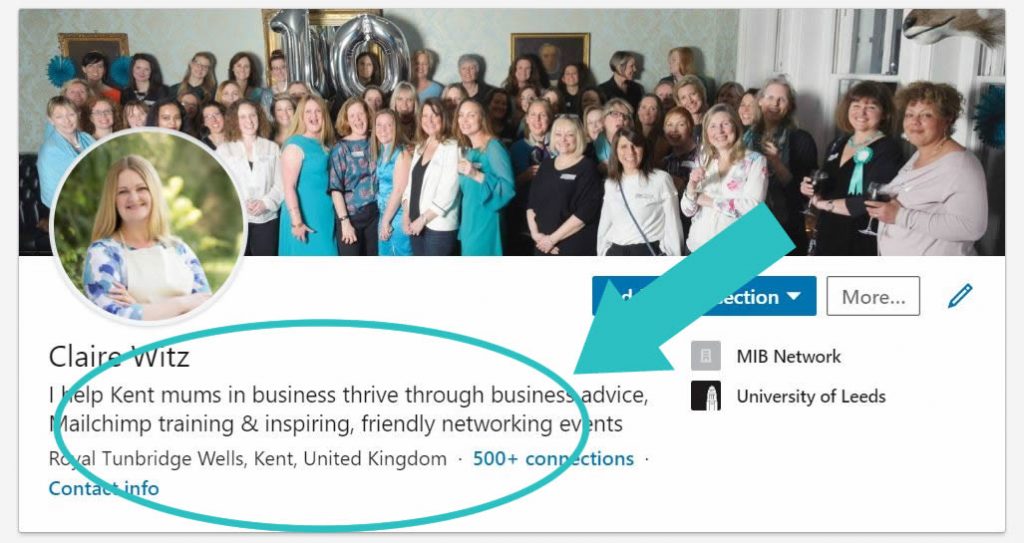
I’ve found it surprisingly hard to do my headline as it’s very tempting to try and cover everything off, but after the talk we had a a little exercise in our members’ Facebook group to give feedback and suggestions on one another’s headlines which really helped. Here’s how mine ended up after a few tweaks and suggestions:
Engage engage engage
Liked any social media platform, LinkedIn is about connecting, not broadcasting into the ether. To get people to read what you have to say, you need to engage with them first.
The easiest way to do this is by liking and commenting on their posts in public (as opposed to by private message) to help their reach and to raise their awareness of you to form the beginnings of a relationship. Because this typically happens less on LinkedIn than on other social media platforms, people notice the likes and comments that much more. Then that will encourage them to start reading your posts and kick-start the customer life cycle we talked about above.
The next step is of course to regularly and consistently post relevant content that relates to your target customer’s problems and how you can help.
Creating content for LinkedIn
Good content connects. It should be centered not around you, but around your target clients show you understand their needs and interests and can solve their problems. It should be clear, confident, contain stories, work to emotions and always have a call to action.
As with all social media, the easiest and most time efficient way is to repurpose and recycle your content and just get.it.done without overthinking and aiming for perfection. For example:
- Post the same thing on your Facebook page, Instagram, LinkedIn etc
- Use extracts from your blogs as an article on LinkedIn and link to the main source on your website
- While a topic is fresh in your mind talk about it in videos
Obviously Cécile is a genius at this so it’s really worth connecting with her LinkedIn to see what she does and how. And if you’d like extra help she offers a “leading with LinkedIn” coaching programme too.
Summary
There are obviously a heap of other things you can do and explore with LinkedIn including recommendations, endorsements, their premium version etc (although Cécile only uses the free version and says that’s adequate for most people), but hopefully this is a good starting point to get you going. Comment below to let us know how you get on.
And finally…
If you’d like to receive invitations to our events and receive the occasional email with news and event tips, click here to sign up to hear from us.