
15 SEO Tips – How to get found by Google in 2019

Last night at our Sevenoaks Mums in Business Network meet up we had a talk about SEO – for the uninitiated that means “Search Engine Optimisation” (i.e. making your website attractive to search engines like Google so that it comes up near the top of relevant search results.
Our expert for the evening was Darren Lock of Populo Marketing (a previous speaker at Tunbridge Wells MIB Network about on Pinterest for Business), and we’re fortunate that one of our members Marie Brown of Beyond the Kitchen Table is a website designer so had lots of input and experience to add too.
Current stats and why you need to make your website Google-friendly
Google is a powerful beast and continually changing it’s algorithms (whatever they are?!) to make sure that if you search for something, you get the results you’re looking for. And because it’s so good at what it does it accounts for 90% of all searches on the internet. That compares to Bing (4%) and Yahoo 3%. So it’s kind of important to make sure your website is Google-friendly if you want to tap into that!
When you search for something, the first 3 results are usually paid-for ads. Under those, the top 5 “organic” results (that means the ones that aren’t paid for) account for 70% of clicks. Very few people click through to the second page of results so those first few spots are the prime organic ones that we all want to reach.
Nobody knows exactly how Google’s algorithms work and they’re constantly changing to keep search results relevant, but there are a few things that we know do help, so that’s what this blog will focus on.
Domain authority and what it means
All websites have a domain ranking – a score which shows its relevance for a specific subject area or industry. This has a direct impact on its ranking by search engines, which try to assess it through “automated analytic algorithms”. The score is out of 100 and obviously the higher the better, but apparently anything over 30 is good. There are lots of tools online to find your domain authority score – click here to give one a go.
Google doesn’t read your website like a person
Google sends out “robotic spiders” to crawl and index websites, and it’s important to recognise that they won’t be looking at your website in the same way that a person would. Instead of pretty colours and layout, they’re looking at the coding and text which sits behind all the pretty stuff.
Having said that, it’s vitally important that you write for people and not just Google. Google keeps an eye on the traffic that they send to your website. If they don’t stay for long because your content is not relevant, then Google will recognise that and it will ultimately affect your search engine performance.
Key words and key phrases and how to use them
In short, these are the things that people type into the search bar on Google when they’re on the hunt for something. And unless your website includes plenty of relevant keywords and phrases, you can’t and won’t come up in the results. I’ve highlighted “relevant” because if your website comes up in results but you’re not obviously offering a relevant product or service, then that visitor will bounce straight off your website and Google will notice that, which will ultimately penalise you.
So it’s important to have a good understanding of specifically what people are likely to be searching for in relation to your business so that you can include those terms in your website to give yourself a better chance of coming up in results.
Keywords and phrases should be used regularly but appropriately throughout your website both in the body (paragraphs), image alt text and H1 and H2 headings (more on what that means later).
To give you a hand, Google has a Keyword tool that you can access via your account with them. More on that later.
Be niche in your key phrases
This is where having a more niche service helps e.g. “newborn photographer in Tunbridge Wells” is likely to get you closer to the top of the search results that “photographer in Kent” (if that’s what you do of course!). A niche phrase will probably get you less traffic but will result in traffic that is far more relevant and likely to convert into business.
Use variations in key phrases
Changing a single word when you search for something can bring up significantly different results. You’ve probably tried it yourself and tweaked what you type in to get more accurate results. So bear in mind that someone might be searching for a slight variation on the key phrases that you’ve used in your website too e.g. “baby photographer Tunbridge Wells”, so make sure to include those variations in your content too.
15 things you can do to make your website Google friendly…
1. Register your business with Google my Business
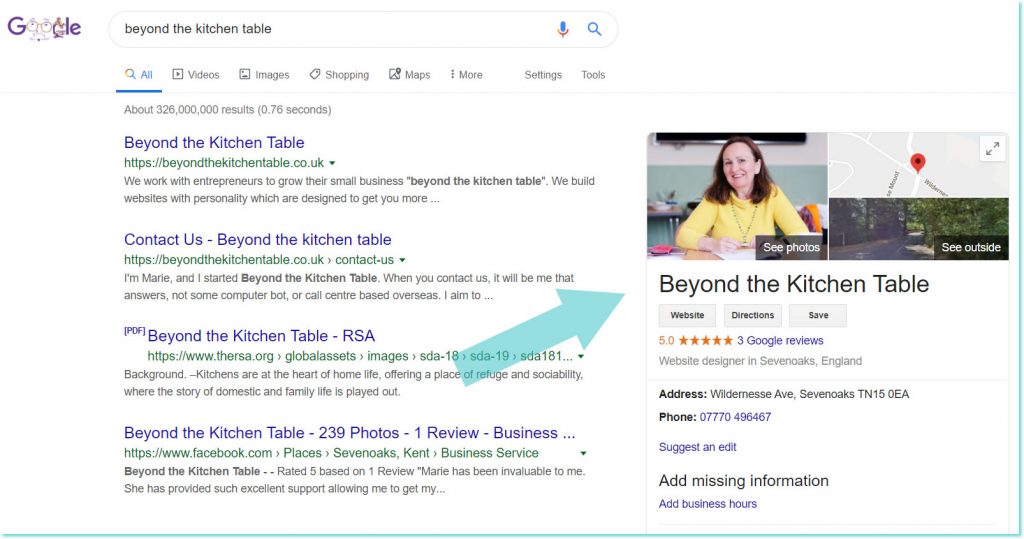
You may well already have a Google account. If not, it’s worth creating one for your business using your email address. Once you’ve done so you can create a Google my Business profile. This means that in addition to the usual list of search results, on the right hand side of the screen you’ll also have a lovely big section with a photo, map either of your premises or the area you cover, your contact details, and if you have any reviews on Google, your star rating. It also means you can start asking your clients to leave you reviews on Google to give you those lovely prominent stars.
See below for an example of Marie’s Google my Business profile.
2. Ask your (happy!) customers to review you on Google
It’s all about those stars people! They stand out in search results, give potential customers confidence and mean you’re much more likely to get clicks to your website.
3. Make your URLs SEO-friendly
A URL is the address of a particular web-page as it shows in the bar of your internet browser at the top of your page including the bit after the “/”. For example https://mibnetwork.org.uk/15-seo-tips-for-your-website-2019/. The bit after the slash is called a “sub domain”. By default, a lot of website builders will create a sub domain for each page automatically but it won’t necessarily be a meaningful one. Google likes meaningful subdomains, so make sure you edit them for every page on your website to make sure it has a good key phrase in it.
4. Use related keywords and phrases in your wording posts
For example, if you have a weight loss recipe on your blog, also add key phrases like “low carb diet” etc (assuming it’s relevant to the post) because people may well be searching for those phrases too.
5. Keep your website alive and kicking with regular fresh content
The easiest way is probably blogging, but keep your homepage fresh and up to date too.
Pro-tip – using the current year as part of the blog title shows your articles are current and up to date when they come up in search results and makes them more likely to be clicked on.
6. Go long with your content
Use lots of words for Google to read. As a bare minimum over 100 per page, 250 is better, but over 500 is best. It also gives you lots of opportunities to pop key words and phrases in there without it reading unnaturally.
This might seem long from a visitor’s perspective since web-users don’t read things in depth, but by breaking your content up with lots of meaningful H2 and even H3 sub-headings to summarise the content, visitors can skim read to get the gist before they decide to read in-depth, and Google spiders definitely will read it all to index your site.
7. Make proper use of H1, H2 and H3 headings
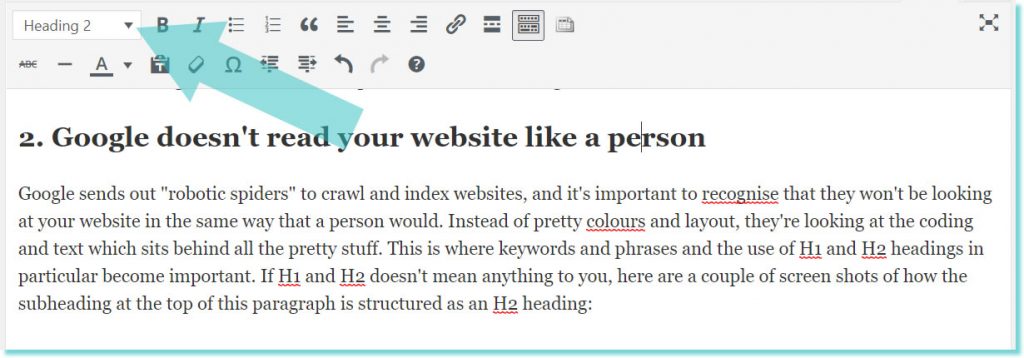
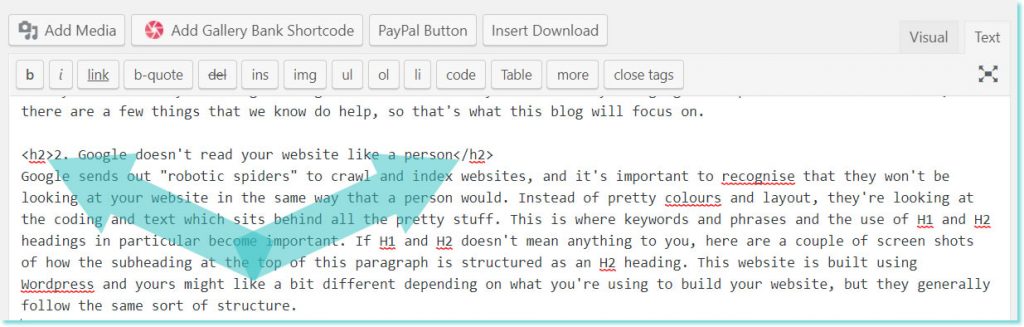
If H1 and H2 doesn’t mean anything to you, from a reader’s perspective, these are the headings and subheadings on your page which are usually formatted in a larger, bolder and or coloured text. From Google’s perspective, they include a bit of code behind the scenes which makes them stand out when your site is being indexed, making it a prime spot to include key words and phrases to help your site to come up in search results.
If you’re not sure how to turn your words into H1, H2 etc., here are a couple of screen shots of how the subheading at the top of this paragraph is structured as an H2 heading. This website is built using WordPress and yours might like a bit different depending on what you’re using but they generally follow the same sort of structure.
How to make an H2 heading on a WYSIWYG editor (What you see is what you get):
How to make an H2 heading on an HTML/text editor:
8. Use target keywords at the beginning of your H1 / H2 / H3 headings
Remember those key words and phrases we talked about above? Include them at the start of your headings and subheadings rather than at the end.
9. Add multimedia to keep people on your pages for longer
Google tracks how people are using your website and they like it when people stay there for longer. It shows that your site is relevant to the search results they came up with so means it’s more likely to come up again.
A good way to make people stay for longer is to give them a video to watch on your web pages and blogs. If you have a youtube channel it’s easy to embed videos onto your web pages.
10. Use outbound links
Google likes websites with links to other external websites because it means you’re “participating” in the internet. So link to relevant sites where you can.
Pro-tip – if you’re recommending products or services provided by someone else, investigate whether they have any affiliate marketing options – this means they give you a unique website link which tracks what referrals and income they generate from your recommendation and you get commission from any sales.
11. Use internal links
Again, use lots of links within your website taking them to other pages within your own website e.g. if you’re writing a blog and mention a topic that you’ve covered previously, link to that blog too. Or link to your events page like this.
12. Get links to your website from other websites
Apparently it really helps your rankings if those 3rd party websites have a high domain ranking authority e.g. bbc.com. Offer to write guest blogs etc to be featured on them.
13. Page loading speed
Make sure your website loads quickly. There are lots of tools out there to check your website speed. There are lots of tips available online to help you find out how to do this or I might write a blog about it at some point!
14. Make your website mobile friendly
If it doesn’t work well on mobile devices you’ll be penalised. Google has a mobile friendly checker if you want to see how yours does – you can google it to find it on google ;-). If you use pop-ups for e.g. Mailchimp sign-up forms, disable them from your mobile website – another thing that Google penalises for.
15. Use Google Analytics
The best way to find out what works and what doesn’t, so that you know what to spend your limited time on, is by looking at your stats. So if you’ve not already got Google Analytics, get it now. Once you’re logged into the google account that you created to Google my Business, you can generate an analytics code that you add to the back end of your website. This means that you can then see exactly what’s happening with your traffic – how they reach your website, what they do when they they’re and how long for. Hugely useful.
Summary
There are obviously a heap of other things you can do to improve your website and search rankings and it’s an ever-changing feast of delights – sadly our websites will never, ever be “done”. But good luck. Leave a comment below with how you’ve got on and to let us know what has worked (and also what hasn’t) for you.
And finally…
If you’d like to receive invitations to our events and receive the occasional email with news and event tips, click here to sign up to hear from us.